
If you have just signed up for OnlyFans and noticed a small pending amount on your card, the figure is almost certainly a card verification hold. This article explains what that hold is, why it appears, how long it lasts, and how to tell it apart from a real subscription charge.

The confusion is understandable. A pending amount looks like a charge in a banking app, and many people assume they have been billed for something they did not choose.
Why a Hold Appears
Card verification is a routine step in online payments. Before a platform stores a card, it sends a small authorisation request to the bank that issued it. The bank checks whether the card number, expiry date, and security code are correct and whether the account can accept a transaction. If everything matches, the authorisation is approved, and the platform knows the card is real.
The amount used for this check is deliberately small so that a customer is not affected if the authorisation is converted into a charge by mistake. Most banks show the request in a pending section rather than a completed transactions list. That distinction matters, because a pending item is not a payment the merchant has collected.
The steps below describe what happens in order, from the moment a card is entered to the moment the pending item disappears.
- You enter the card number, expiry date, and security code on the payment screen.
- The platform sends a small authorisation request to the issuing bank.
- The bank approves the request and moves the amount into a pending state.
- The platform receives confirmation and links the card to your account.
- The reservation expires, usually without any money leaving the account.
- The pending item drops off your statement or banking app on its own.
Nothing about this process requires you to approve a subscription. The hold is a technical confirmation step, not a product purchase. That is why it can appear even when you joined a page that costs nothing to follow.

How Much and How Long
Typical verification holds are small, and the exact figure depends on the platform and the bank. Some banks round the amount up when they display it, which is why a tiny hold can look larger than expected in a mobile app. The table below summarises the usual ranges and what you can expect at each stage.
| Stage | Typical amount | Typical duration |
|---|---|---|
| Authorisation sent | A small fixed amount | Immediate |
| Pending on statement | Same small amount | A few business days |
| Released or expired | Not collected | Up to one billing cycle |
| Displayed in banking app | May be rounded up | Varies by bank |
Banks differ in how they label pending items. Some show the merchant name, others show a generic description, and some hide the amount until the item settles. If the label is unclear, the pending section of your app is a better place to look than the completed transaction history.
Tip: take a screenshot of the pending item on the day it appears. The date and the exact wording make it much easier to explain the situation if you later need to contact your bank.

Hold Versus Charge
The difference between a hold and a charge is the difference between a reservation and a payment. A hold reserves part of your available balance but does not transfer money to the merchant. A charge completes the transfer, appears in your transaction history, and stays there.
The list below shows how each one usually appears when you review your account.
- A hold sits in a pending or authorisation section and may disappear without any notice.
- A charge appears in the completed history with a settled date attached to it.
- A hold can reduce your available balance temporarily while leaving the real balance unchanged.
- A charge reduces the real balance and remains visible on statements for months.
- A hold often shows a generic merchant description rather than a clear product name.
- A charge shows a clear description and, where applicable, a recurring payment marker.
Paid subscriptions on the platform run from $4.99 at the minimum to $49.99 at the maximum, with most pages somewhere between $4.99 and $15 and many averaging $5 to $10. There is no base price below $4.99, although promotional first months may dip below that figure. None of those amounts are collected through a verification hold.
When a creator raises the subscription price, auto-renew stops, and existing access lasts until the current paid period ends. That rule matters when you are checking your statement, because a change in price does not produce a surprise charge mid-cycle.

When It Does Not Clear
Most holds clear on their own within a few business days. A hold that lingers for longer is usually a bank-side delay rather than a problem with the platform. The first step is to check the pending section again and confirm the item is still there rather than already settled. For a starting point, free onlyfans france collects free pages.
If the item has not moved after a full billing cycle, contact your bank first. Ask whether the authorisation is still open, whether it can be released manually, and whether it will expire automatically. Banks can usually void an unused authorisation without involving the merchant.
Contact platform support only if the bank confirms the authorisation was completed as a charge. In that case, the bank can provide a reference number, and support can trace the transaction on its side. The list below outlines the costs you might see across a typical first month so you can compare them with your statement.
- Week one: a pending verification item and, if you chose a paid page, the first subscription payment.
- Week two: the pending item clears or the subscription renews, depending on the billing date.
- Week three: optional pay-per-view messages or tips if you choose to send them.
- Week four: renewal of any subscription that is still active at its current price.

Adding Cards to Free Pages
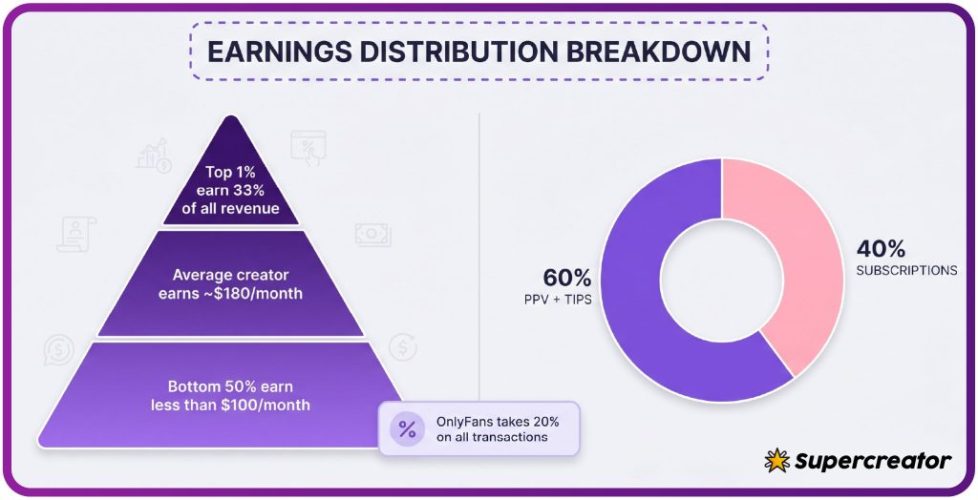
A free page is one where the subscription price is set to $0. Creators on those pages earn through pay-per-view messages and tips instead of a monthly fee, and the platform takes a 20% fee on everything, including subscriptions, tips, and pay-per-view, leaving the creator 80%. Adding a card to a free page can still trigger a verification hold, because the platform verifies payment details regardless of the current price.
To confirm that nothing was actually billed, follow the steps below and compare what you find with the pending section of your banking app.
- Open your subscription list and check that the page shows as free rather than paid.
- Review your payment history for completed charges rather than pending items.
- Check the pending section of your bank app for the small authorisation amount.
- Wait a few business days and confirm the pending item has disappeared.
- Keep a screenshot of both screens in case the item does not clear.
A hold on a free page is not evidence of a hidden subscription. It reflects the card check that runs when payment details are stored. If the page is genuinely free, no subscription payment will appear in your completed history.

Removing a Card Safely
Deleting a card stops future payments but does not cancel a subscription by itself. Access continues until the end of the period you already paid for, and the subscription will fail to renew once the card is gone. If you want to stop the subscription entirely, cancel it first and then remove the card after the current period ends.
Removing a card mid-cycle can interrupt access sooner than expected if the platform attempts a renewal before the period finishes. The list below covers the mistakes that cause the most confusion.
- Deleting the card without cancelling the subscription first.
- Assuming a removed card cancels every subscription on the account at once.
- Removing the card while a pending verification item is still open.
- Expecting an immediate refund of a period that has already been paid for.
- Forgetting that a price change stops auto-renew and leaves access until the period ends.
The safer order is to cancel the subscription, confirm the end date, let the paid period finish, and then remove the card. That sequence avoids both an interrupted period and an unexpected renewal attempt.
Keeping Records
Records make disputes easier to resolve. Screenshot the pending item on the day it appears, note the date, and save the page that shows whether the subscription was free or paid. If you later need to contact your bank or support, these details answer most of the first questions you will be asked.
Ranking sites exist partly because the platform has no built-in discovery feed or directory, so readers often arrive at a page after finding it elsewhere. BestOnlyFans collects free pages in one place, and the same record-keeping habits apply whether you found a page through a ranking site or a direct link. BestOnlyFans does not process payments, so a pending item will always trace back to the platform or your bank rather than to a directory.
| What to record | Why it helps |
|---|---|
| Screenshot of the pending item | Shows the exact wording and amount |
| Date it first appeared | Establishes the normal clearance window |
| Page price at signup | Confirms free or paid status |
| Bank reference number | Speeds up any support request |
Once the pending item clears, keep the screenshots for a short while in case a similar item appears later. If you want a starting point for browsing free pages, this guide to free onlyfans france explains how those listings are organised. A final check of BestOnlyFans listings against your own subscription list is a quick way to confirm that every charge matches a page you recognise.
FAQ
Is the small pending amount a subscription charge?
No. It is a temporary card verification hold that is normally released without any money being collected.
How long does the hold usually last?
Most holds clear within a few business days, though some banks take up to one full billing cycle to remove them.
Can a free page still trigger a hold?
Yes. The card check runs whenever payment details are stored, even when the subscription price is set to $0.
What should I do if it never clears?
Contact your bank first, ask whether the authorisation is still open, and keep your screenshots for reference.